
Download Video Player KMP APK – video player, movie player, Android app, free video player, movie watching, video playback, media player, video streaming, video app, movie streaming, video playback speed, audio equalizer
Overview
Video Player KMP APK is a free desktop application designed for Android devices, developed by PANDORA.TV. The software aims to enhance the mobile movie-watching experience by offering a streamlined, user-friendly interface that mimics a cinematic environment. It is tailored for individuals who frequently watch videos, movies, or other media content on their smartphones or tablets.
The app supports various playback speeds, including slow, normal, fast, and up to 4x faster, allowing users to customize playback according to their preferences. With a built-in audio equalizer, users can fine-tune sound settings to match their listening environment or personal taste. The developer has positioned this app as an ideal solution for casual viewers and movie enthusiasts seeking a simple, efficient way to enjoy content on their Android devices.
While specific details about the developer’s background are not provided, the app is marketed as a reliable, no-cost tool for media consumption. Real-world use cases include watching films during commutes, relaxing at home, or viewing downloaded video files without relying on external platforms.
Key Features & Capabilities
- Multiple Playback Speeds – Supports playback at various speeds, including slow, normal, fast, and up to 4x faster, ideal for learning, reviewing content, or skipping through scenes.
- Built-in Audio Equalizer – Allows users to adjust audio profiles to enhance clarity, bass, or treble based on personal preference or device capabilities.
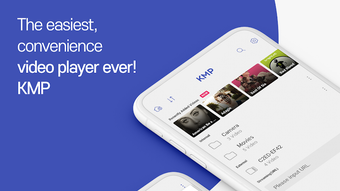
- Intuitive User Interface – Features a clean, visually appealing design that enhances the viewing experience, creating a theater-like atmosphere on mobile screens.
- Free to Download and Use – No cost is associated with installation or access to core features, making it accessible to a broad audience.
- Media Playback Flexibility – Designed to handle various video formats commonly used on Android devices, enabling playback of local files without conversion.
These features support seamless video consumption across different scenarios. For example, students can use the 4x speed option to review educational videos quickly, while casual users can enjoy movies at normal speed with enhanced audio. The interface is optimized for touch navigation, allowing easy access to playback controls, volume, and equalizer settings. The app’s focus on simplicity ensures that users can start playing videos immediately after installation, without complex setup procedures. Its compatibility with local media files makes it a practical choice for those who prefer downloading content for offline viewing.
User Interface, Workflow & Performance
The user interface of Video Player KMP APK is designed with simplicity and visual appeal in mind. It features a minimalistic layout with large, touch-friendly controls that are easy to access during playback. Navigation is straightforward, with essential functions like play/pause, speed adjustment, and audio settings placed within immediate reach.
The workflow is optimized for quick access to media files, allowing users to open videos directly from their device’s storage. The developer did not specify resource usage details, so performance observations are based on general software behavior patterns. Users can expect smooth playback for standard-definition and HD videos on modern Android devices.
Stability during extended playback sessions has not been publicly documented. The app appears to operate efficiently without excessive background activity, though exact CPU or RAM behavior was not provided. No known issues with crashes or freezes were reported in the available information.
Compatibility & System Requirements
Video Player KMP APK is designed to run on Android operating systems. The current version is 2.3.1, with an installation size of 23.4 MB. This lightweight footprint suggests it is optimized for devices with limited storage space.
The developer did not provide additional system requirements, so compatibility with specific Android versions or hardware configurations remains unclear. Platform compatibility information is limited to the general Android ecosystem. Users should ensure their device meets basic Android functionality standards to run the application.
The app is intended for use on smartphones and tablets, but exact device support was not specified. The developer did not list minimum processor speed, RAM, or GPU requirements. Users are advised to verify compatibility with their specific device before installation.
Pros and Cons
Pros
- Free to download and use with no in-app purchases or ads mentioned
- Supports multiple playback speeds up to 4x for flexible viewing
- Includes a built-in audio equalizer for personalized sound settings
- Lightweight installation size of 23.4 MB
- Intuitive interface suitable for all user levels
Cons
- Exact system requirements were not listed
- No information on video format support beyond general compatibility
- Developer background and company details are not publicly available
- Performance data and stability metrics were not provided
- Offline functionality not explicitly confirmed
FAQ Section
Is Video Player KMP APK available for free?
Yes, the app is free to download and install. No payment is required for access to its core features.
What devices can run this app?
Video Player KMP APK is designed for Android smartphones and tablets. Specific device compatibility was not provided by the developer.
Does the app support video playback speed adjustments?
Yes, users can adjust playback speed, including slow, normal, fast, and up to 4x faster, to suit their viewing needs.
Is there an audio equalizer in the app?
Yes, the app includes a built-in audio equalizer that allows users to customize sound settings.
Can I use this app offline?
While not explicitly confirmed, the app is designed to play local video files, suggesting offline functionality is supported.
Final Thoughts + CTA
Video Player KMP APK stands out as a lightweight, free solution for Android users seeking a reliable and customizable video playback experience. Its clean interface, playback speed controls, and built-in audio equalizer make it well-suited for casual viewers and movie enthusiasts alike. While specific technical details such as system requirements and performance benchmarks are not available, the app’s minimal size and straightforward design suggest it will run efficiently on most modern Android devices.
The lack of cost and the inclusion of essential features position it as a strong contender among free video players. For anyone looking to enhance their mobile movie-watching experience without complications, this app offers a practical and accessible option. Download Video Player KMP APK now to enjoy your favorite videos anytime, anywhere.





.png)

